This post is here to help you get comfortable using our new Discourse community space.
Discourse is an easy-to-use online discussion platform. Think of it like a blend of email, message boards, and group chats, but organized and designed for meaningful, long-term conversation. Here is some lingo to get you started:
 Categories = Topics of Interest
Everything is organized into “categories”(like folders). Click one that interests you to view previous posts and discussions posted here, or post your own!
 Topics = Conversations
Inside a category, you’ll see “topics”. These are individual conversations, such as questions, experience sharing, etc. Click into one to read and reply, or create your own. These can also be referred to as “threads,” where conservations and replies occur.
 Replies = Your Voice
Want to respond to someone’s topic? Scroll to the bottom of a topic and click “Reply” or hit the blue reply arrow next to a specific message.
 Search Bar = Lifesaver
Looking for something? Type keywords in the top-right search bar to quickly find past questions, posts, or threads.
 Tags = Folders or Filters
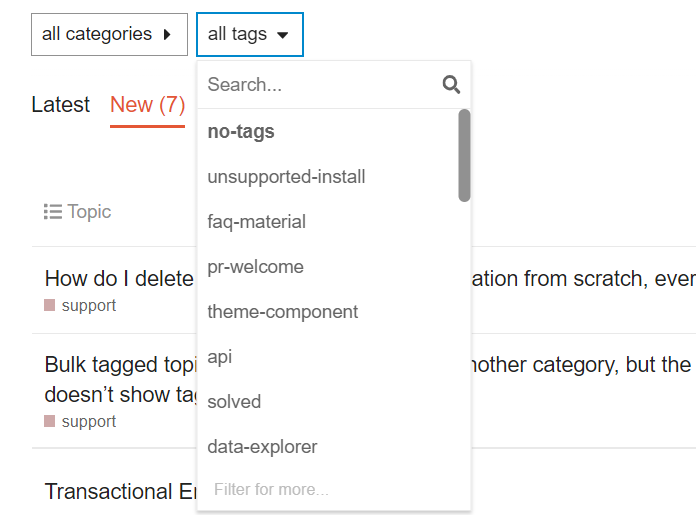
While you are browsing through topics inside the various categories, navigate to the top and try filtering with tags! These tags serve as folders, which you can select when creating a topic. These tags help to filter a search and browse relevant content!
Here is how the tags will appear.
 Like and Bookmark
Click the icon to show support or bookmark helpful posts with the ribbon icon to find them later.
 Quick Tips
- Stay on topic: Try to reply within the relevant category or topic thread.
- @Mention others: Use
@nameto tag another user in your reply. - Use the editor: You can format text (bold, links, bullets) using the toolbar above your reply box.
- Notifications: You’ll get emails or alerts for replies to your posts, mentions, or followed topics- you can adjust this in your profile settings, and change the frequency of email digests as well!
Here is a great YouTube video to give you an in-depth walkthrough!
The following video helps explain topics, and how to post and reply.